Red Teaming for Rookies: Crafting Your First Custom Exfiltration App
The scenario for this writeup is a red team engagement, during which you successfully bypassed the client’s defenses to …
I fine-tuned a 30B parameter model (GLM-4.7-Flash) on a single 48GB GPU. Everyone said you need 60GB+. The trick: 80% of the model’s weights are stored in a format that no quantization library can touch, so you offload them to CPU RAM instead. Four monkey-patches to make the training stack not crash, a custom autograd hook to stop PyTorch from eating all your VRAM, and about 9 hours of training per run. Three runs produced broken models before I figured out you can’t just train the attention layers on an MoE model, you need the shared expert FFN layers too. The working pipeline uses 30GB VRAM and ~114GB RAM. If you have a 48GB GPU and 128GB+ of system memory, you can do this.
This whole thing started, in my naivety, as a quick check to see how fine-tuning a model for offensive security operations impacts its capabilities but then it morphed into research on how to fine-tune a model that does not fit on your GPU VRAM. These are my documented steps with no restraints on details, so this is not for everyone.
GLM-4.7-Flash is a 30 billion parameter MoE language model with 64 experts per layer and roughly 3 billion active parameters per forward pass. The fused 3D expert weight tensors cannot be quantized by BitsAndBytes, which means 80% of the model stays in full bf16 no matter what quantization settings you throw at it. 48GB is not enough. Except it is, if you’re willing to go deep. The approach I landed on combines 8-bit quantization with CPU offloading, four monkey-patches to the transformers/accelerate/bitsandbytes stack, and a custom autograd tensor management strategy using PyTorch’s saved_tensors_hooks API. Training holds stable at 30GB VRAM with 18GB of headroom. I could not find any prior documented case of LoRA fine-tuning this model on hardware with less than 60GB of VRAM so I had to do it myself.
| Component | Specification |
|---|---|
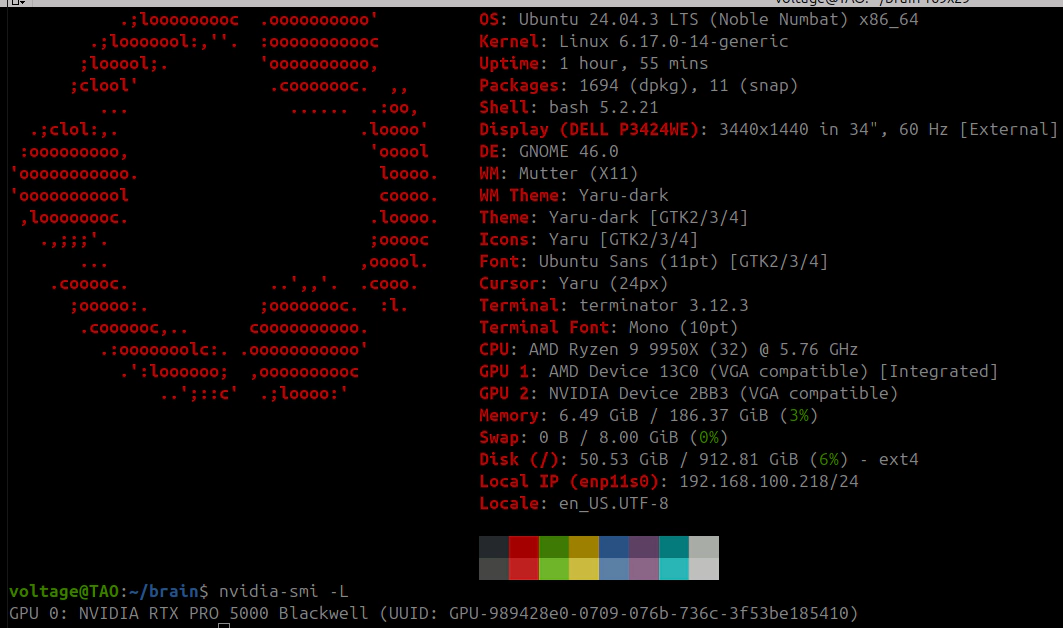
| GPU | NVIDIA RTX PRO 5000 Blackwell, 48GB GDDR7, PCIe 5.0 x16 |
| CPU | AMD Ryzen 9 9950X, 16 cores / 32 threads, Zen 5 |
| Motherboard | ASUS ProArt X870E-CREATOR WIFI |
| RAM | 192GB DDR5 (186GB usable) |
| Storage | Samsung 970 NVMe SSD |
| OS | Ubuntu 24.04.3 LTS, kernel 6.17.0-14-generic |
| NVIDIA Driver | 590.48.01 (nvidia-driver-open, open kernel module) |
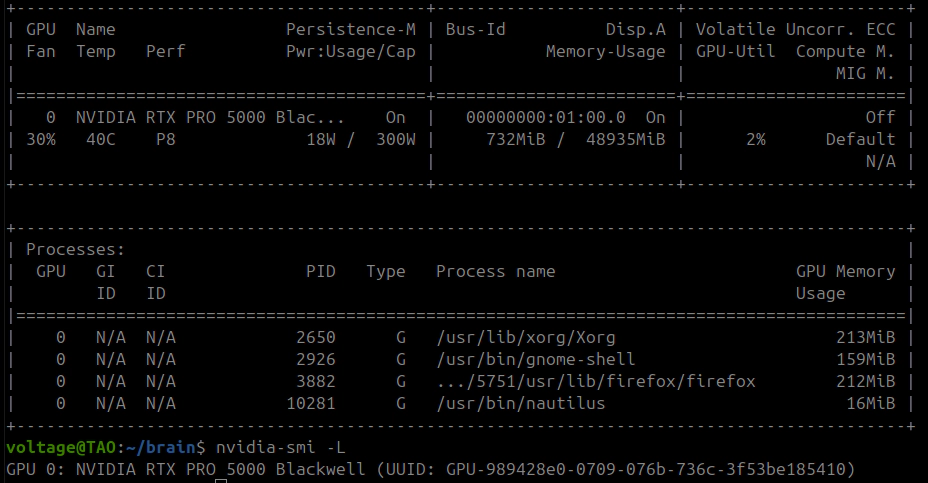
The CPU-offloaded model portion (~28GB) has to live in RAM as real tensors, not memory-mapped, because they get shuttled to and from the GPU on every forward and backward pass, this means you need probably a minimum of 120GB of RAM for this to run with no impact on the OS performance.
| Package | Version |
|---|---|
| Python | 3.12 |
| PyTorch | 2.10.0+cu128 |
| transformers | 5.3.0.dev0 |
| accelerate | 1.13.0.dev0 |
| bitsandbytes | 0.49.2 |
| peft | 0.18.1 |
| trl | 0.24.0 |
These versions matter. The patches below target bugs and behaviors in this exact stack. Newer releases might fix some of these, or break things in new ways.
BitsAndBytes quantization (the backbone of QLoRA) works on nn.Linear layers. It takes 2D weight matrices and replaces them with quantized representations (Int8 or NF4).
GLM-4.7-Flash does not store its expert weights as nn.Linear. They are fused 3D nn.Parameter tensors:
experts.gate_up_proj: shape [64, 3072, 2048], dtype bfloat16
experts.down_proj:    shape [64, 2048, 1536], dtype bfloat16
BitsAndBytes does not see these. Does not touch them. With 46 MoE layers (layers 1-46; layer 0 is dense), the expert weights make up roughly 80% of the total model parameters.
| Quantization Mode | Expected VRAM | Measured VRAM | Notes |
|---|---|---|---|
| Full bf16 | ~60GB | ~60GB | Does not fit |
| 8-bit (load_in_8bit) | 15-20GB | ~46GB | Experts remain bf16 |
| 4-bit NF4 (load_in_4bit) | 10-15GB | ~45GB | Experts remain bf16 |
The “Expected” column is what you’d get if BitsAndBytes quantized everything. It does not. The gap is the unquantized expert tensors sitting in bf16, and that gap does not shrink no matter what quantization flags you set.
| Approach | Result |
|---|---|
| DeepSpeed ZeRO-3 + CPU offload | Does not support MoE. Hard limitation. |
| Unsloth bf16 LoRA with MoE optimizations | Needs ~58GB minimum for this model |
| transformers-qwen3-moe-fused (GGUF-quantized MoE training) | Qwen3 only |
| PEFT v0.17+ target_parameters (LoRA on nn.Parameter) | Experimental, untested on fused 3D tensors |
None of these work for GLM-4.7-Flash on sub-60GB hardware.
Split the model across GPU and CPU using accelerate’s device_map="auto" with explicit memory caps:
model = AutoModelForCausalLM.from_pretrained(
    "unsloth/GLM-4.7-Flash",
    quantization_config=BitsAndBytesConfig(
        load_in_8bit=True,
        llm_int8_enable_fp32_cpu_offload=True,
    ),
    device_map="auto",
    max_memory={0: "32GiB", "cpu": "100GiB"},
    dtype=torch.bfloat16,
    attn_implementation="eager",   # flash attention has issues with CPU-offloaded layers
)
About 27 layers land on GPU (~30GB). The remaining 20 layers plus embeddings and the LM head go to CPU RAM. Only the nn.Linear attention layers on GPU get 8-bit quantization.

LoRA adapters target the attention projections shared across all experts. In the initial runs, this was attention-only:
target_modules = ["q_a_proj", "q_b_proj", "kv_a_proj_with_mqa", "kv_b_proj", "o_proj"]
21 million trainable parameters. 0.07% of the 30 billion total. This turned out to be insufficient; see section 20 for why attention-only LoRA breaks MoE models and the corrected target list.
Four monkey-patches, applied before model loading. I found these one crash at a time: fix one, run it again, hit the next wall. Each fixes something specific that breaks when you combine LoRA training with partial CPU offloading.
transformers v5 passes _is_hf_initialized to bitsandbytes.nn.Int8Params.__new__(). That constructor does not accept it. TypeError on model load.
API mismatch between transformers 5.x and bitsandbytes 0.49.x.
import bitsandbytes as bnb
_orig_int8_new = bnb.nn.Int8Params.__new__
def _patched_int8_new(cls, data=None, requires_grad=True, **kwargs):
    kwargs.pop("_is_hf_initialized", None)
    return _orig_int8_new(cls, data=data, requires_grad=requires_grad, **kwargs)
bnb.nn.Int8Params.__new__ = _patched_int8_new
BitsAndBytes 8-bit layers store quantized weights (CB) and a per-row scale factor (SCB). During forward, accelerate hooks move CPU-offloaded layers to GPU, the 8-bit matmul computes CB and SCB. After forward, the patched hooks (Patch 4) move layers back to CPU. On the next access during backward, SCB is None while CB is still there. Crash in MatMul8bitLt.backward.
The scale factor lives on the MatmulLtState object and gets partially invalidated during the CPU/GPU transfer cycle.
import bitsandbytes.autograd._functions as bnb_fn
_orig_matmul_backward = bnb_fn.MatMul8bitLt.backward
@staticmethod
def _patched_matmul_backward(ctx, grad_output):
    state = ctx.state
    if state.CB is not None and state.SCB is None:
        state.SCB = state.CB.abs().max(dim=1).values.float()
    return _orig_matmul_backward(ctx, grad_output)
bnb_fn.MatMul8bitLt.backward = _patched_matmul_backward
CB.abs().max(dim=1).values.float() recomputes the correct per-row absolute maximum scale factor.
transformers v5 tries to pre-allocate a memory block sized to the full model as a CUDA allocator warmup. When you are already at 30GB out of 48GB, this just kills the process before training starts.
import transformers.modeling_utils
transformers.modeling_utils.caching_allocator_warmup = lambda *args, **kwargs: None
This is the big one. When accelerate offloads layers to CPU via AlignDevicesHook, the lifecycle is:
pre_forward: load layer weights from CPU to GPUpost_forward: replace GPU weights with meta tensors (empty placeholders, shape and dtype but zero data)Meta tensors save memory and work fine for inference. For training they are a problem. The backward pass needs the actual weight data to compute gradients. Meta tensors have no data. Gradient computation fails.
Patch post_forward to move weights to CPU (real data preserved) instead of replacing with meta:
from accelerate.hooks import AlignDevicesHook
from accelerate.utils import named_module_tensors

_orig_post_forward = AlignDevicesHook.post_forward

def _patched_post_forward(self, module, output):
    if self.offload:
        for name, _ in named_module_tensors(
            module, include_buffers=self.offload_buffers, recurse=False
        ):
            try:
                param = getattr(module, name)
                if param is not None and param.device.type not in ('cpu', 'meta'):
                    param.data = param.data.to('cpu')
            except Exception:
                pass
    if self.io_same_device and self.input_device is not None:
        if isinstance(output, torch.Tensor):
            output = output.to(self.input_device)
        elif isinstance(output, tuple):
            output = tuple(
                o.to(self.input_device) if isinstance(o, torch.Tensor) else o
                for o in output
            )
    return output

AlignDevicesHook.post_forward = _patched_post_forward
After loading, run a dummy forward pass to cycle all meta parameters through GPU and back to CPU as real tensors:
dummy = tokenizer("test", return_tensors="pt").to("cuda")
with torch.no_grad():
    _ = model(**dummy)
del dummy
gc.collect()
torch.cuda.empty_cache()
Post-materialization state: 0 meta parameters, ~347 CPU parameters, ~404 GPU parameters.
All four patches applied. Model loads. LoRA attaches. I thought I was done. First training step: OOM at 45GB. The base model only uses 30GB. Where did the other 15GB come from?
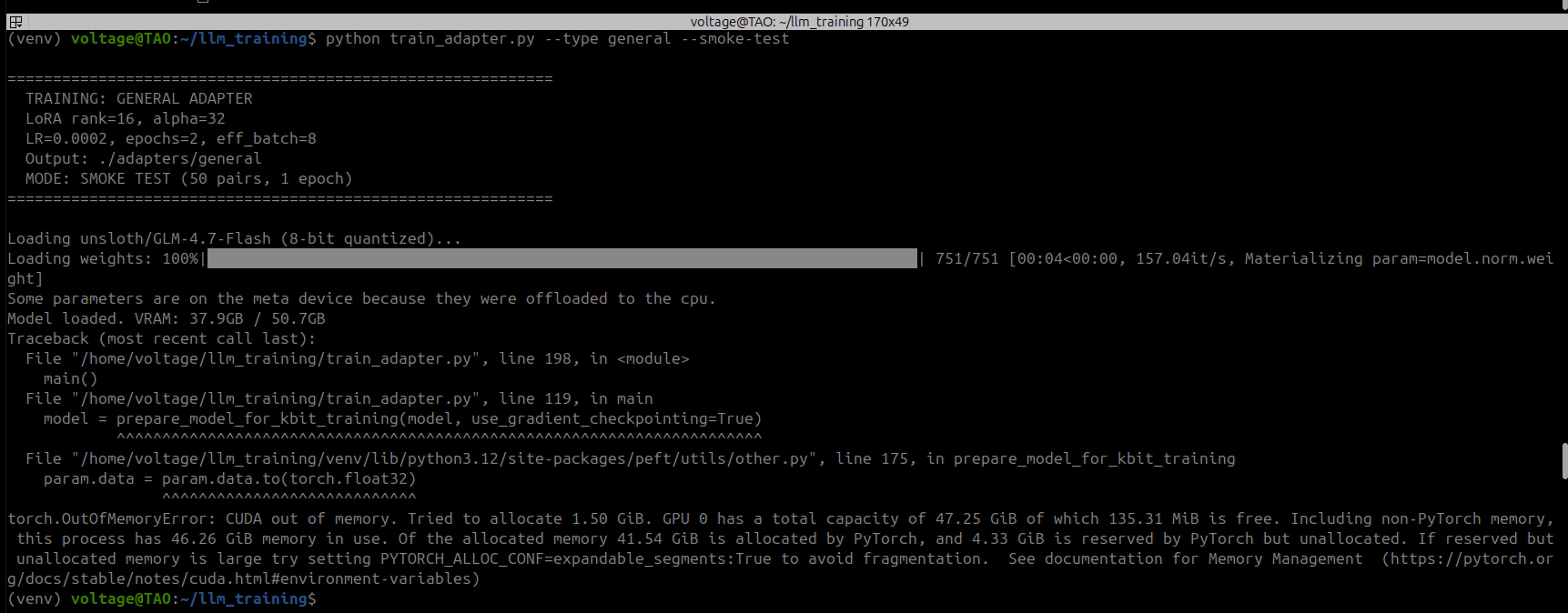
PyTorch’s autograd graph. During forward with requires_grad=True, PyTorch saves references to tensors involved in each computation for use during backward. Accelerate hooks load each CPU-offloaded layer to GPU for its forward pass, but autograd grabs a reference to the GPU tensor before the patched hook moves it back to CPU. After all 47 layers, autograd holds GPU references to every single layer’s weights at the same time. 30GB of base model + 15GB of autograd-pinned weight references = OOM.
torch.autograd.graph.saved_tensors_hooks intercepts every tensor save/load in the autograd graph. I used it to push saved tensors to CPU the moment autograd captures them:
def pack_to_cpu(tensor):
    """Intercept autograd tensor save: move CUDA tensors to CPU."""
    if tensor.device.type == 'cuda':
        cpu_tensor = tensor.to('cpu')
        return (cpu_tensor, 'cuda:0')
    return (tensor, None)

def unpack_from_cpu(packed):
    """Intercept autograd tensor load: move back to GPU for backward."""
    tensor, device = packed
    if device is not None and tensor.device.type == 'cpu':
        return tensor.to(device)
    return tensor
At any point during forward or backward, only the current layer’s tensors sit on GPU. Everything else is parked in CPU RAM.
saved_tensors_hooks cannot coexist with gradient checkpointing:
use_reentrant=False: Gradient checkpointing uses the same saved_tensors_hooks API internally. Nesting them produces CheckpointError: Recomputed values for tensors have different metadata because the inner hook alters tensor locations.use_reentrant=True: During checkpoint recomputation, the model re-runs forward layers. Patch 4 moves weights to CPU after forward. Backward tries to recompute on GPU but the weights are on CPU. Device mismatch.Disable gradient checkpointing entirely. saved_tensors_hooks gives you equivalent or better memory savings by offloading all saved tensors, not just activation checkpoints.
The saved_tensors_hooks context has to wrap the entire training step (forward + backward + gradient accumulation):
class OffloadSFTTrainer(SFTTrainer):
    def training_step(self, *args, **kwargs):
        with torch.autograd.graph.saved_tensors_hooks(pack_to_cpu, unpack_from_cpu):
            result = super().training_step(*args, **kwargs)
        torch.cuda.empty_cache()
        return result

    def prediction_step(self, *args, **kwargs):
        with torch.autograd.graph.saved_tensors_hooks(pack_to_cpu, unpack_from_cpu):
            result = super().prediction_step(*args, **kwargs)
        torch.cuda.empty_cache()
        return result
You need both overrides. training_step for training, prediction_step for eval. Miss the second one and your training completes an entire epoch, then OOMs at the eval checkpoint. Ask me how I know.
HuggingFace Trainer defaults per_device_eval_batch_size to 8 if you don’t set it. Does not matter that you set per_device_train_batch_size to 1. With GLM-4.7-Flash’s vocabulary of 154,820 tokens, eval batch size 8 means:
[8, 2048, 154820] * 4 bytes (float32 for cross_entropy) = ~10.1 GB
Set it to 1:
SFTConfig(
    per_device_train_batch_size=1,
    per_device_eval_batch_size=1,
    ...
)
This one killed my first full training attempt at the halfway point. All 85 training steps of epoch 1 completed fine over 4 hours. Then eval kicked in between epochs and OOM’d instantly. The traceback points at cross_entropy, not at batch size. Nothing in the error message tells you the actual problem. You just see an OOM in a loss function and start questioning everything you built.
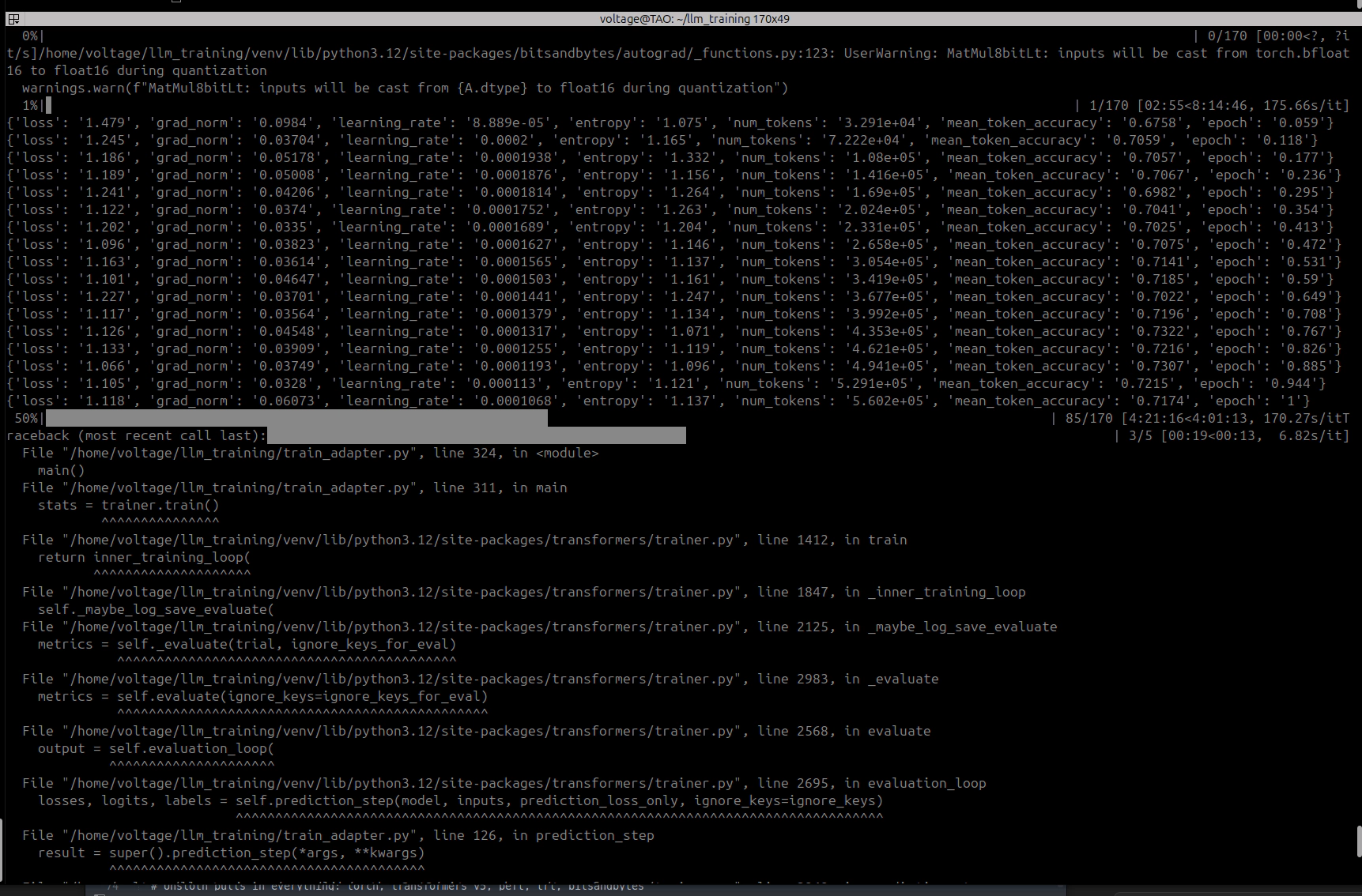
After get_peft_model(), LoRA adapter weights inherit the device of their parent base layers. CPU-offloaded layers produce CPU-resident LoRA weights. Move them to GPU:
for name, param in model.named_parameters():
    if param.requires_grad and param.device.type != 'cuda':
        param.data = param.data.to('cuda:0')
LoraConfig(
    r=16,
    lora_alpha=32,
    lora_dropout=0.05,
    target_modules=["q_a_proj", "q_b_proj", "kv_a_proj_with_mqa", "kv_b_proj", "o_proj"],
    bias="none",
    task_type="CAUSAL_LM",
)
Target modules are the attention projections shared across all experts. These are nn.Linear layers, compatible with standard LoRA. The fused expert nn.Parameter tensors stay frozen.
Trainable parameters: 21,031,936 (0.07% of 29,964,422,912 total).
Note: This attention-only configuration produced models with degraded output quality across three training runs. The corrected configuration (section 20) adds shared expert FFN layers (gate_proj, up_proj, down_proj) to the target list.
These are the Run 1 hyperparameters. They were too aggressive; see section 14 for the diagnosis and section 18 for the corrected values.
SFTConfig(
    per_device_train_batch_size=1,
    per_device_eval_batch_size=1,
    gradient_accumulation_steps=8,     # effective batch size = 8
    num_train_epochs=2,
    learning_rate=2e-4,                # TOO HIGH — see section 17
    warmup_ratio=0.05,
    weight_decay=0.01,
    bf16=True,
    max_length=2048,
    gradient_checkpointing=False,      # incompatible with saved_tensors_hooks
    dataloader_pin_memory=False,       # pinned memory conflicts with CPU offloading
)
714 instruction-response pairs covering security domain knowledge (offensive and defensive), split 95/5 into 678 training and 36 validation samples. Formatted with GLM-4.7-Flash’s chat template using system/user/assistant roles. Longest sequence observed: ~1,500 tokens, well within the 2,048 limit.
| Metric | Value |
|---|---|
| Base VRAM after model load | 29.2 GB |
| VRAM after LoRA attachment | 30.0 GB |
| VRAM during training (stable) | 30.0 GB |
| Available VRAM headroom | 18 GB |
| System RAM usage (model offload) | ~28 GB |
| Total system RAM used (including OS) | ~114 GB |
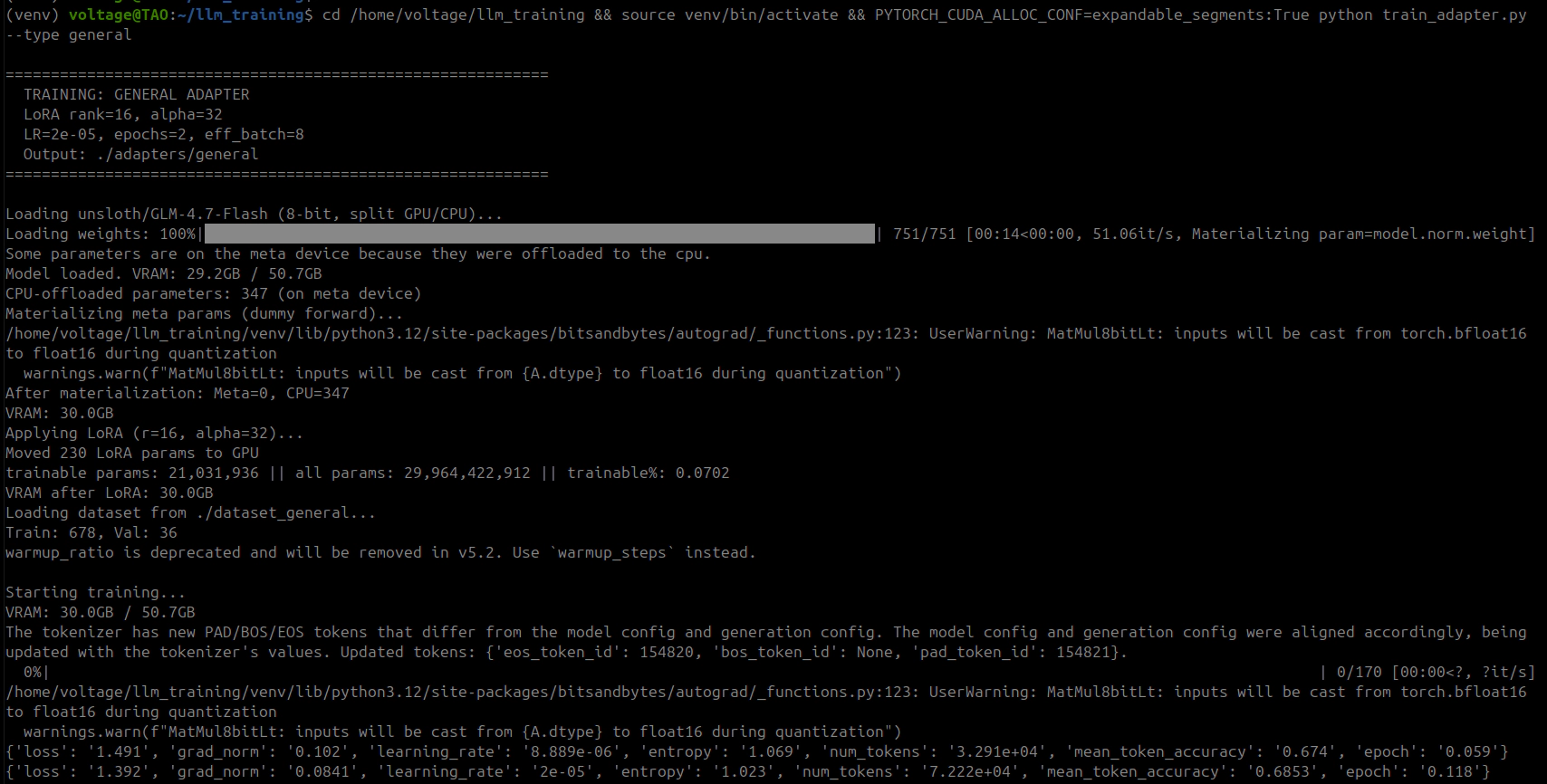
| Step | Loss | Grad Norm | Token Accuracy | Epoch |
|---|---|---|---|---|
| 5 | 1.479 | 0.092 | 67.6% | 0.06 |
| 25 | 1.243 | 0.042 | 69.7% | 0.30 |
| 45 | 1.165 | 0.046 | 71.4% | 0.53 |
| 65 | 1.126 | 0.041 | 73.3% | 0.77 |
| 85 | 1.116 | 0.057 | 71.7% | 1.00 |
Epoch 1 Evaluation: eval_loss=1.209, eval_token_accuracy=71.6%
| Metric | Value |
|---|---|
| Seconds per step | ~170-190 |
| Steps per epoch | 85 |
| Time per epoch | ~4.5 hours |
| Total training time (2 epochs) | ~9 hours |
| Adapter size (safetensors) | 81 MB |
The per-step cost comes from CPU/GPU tensor transfers. Each step runs forward through all 47 layers (~20 of which require CPU-to-GPU weight transfers), then backward through all of them again (same transfers plus autograd unpacking), and does this 8 times per optimizer step because of gradient accumulation.
~3 minutes per step. About 10x slower than pure-GPU training. Not fast, but it runs and it finishes. I started it before bed and it was done by morning.
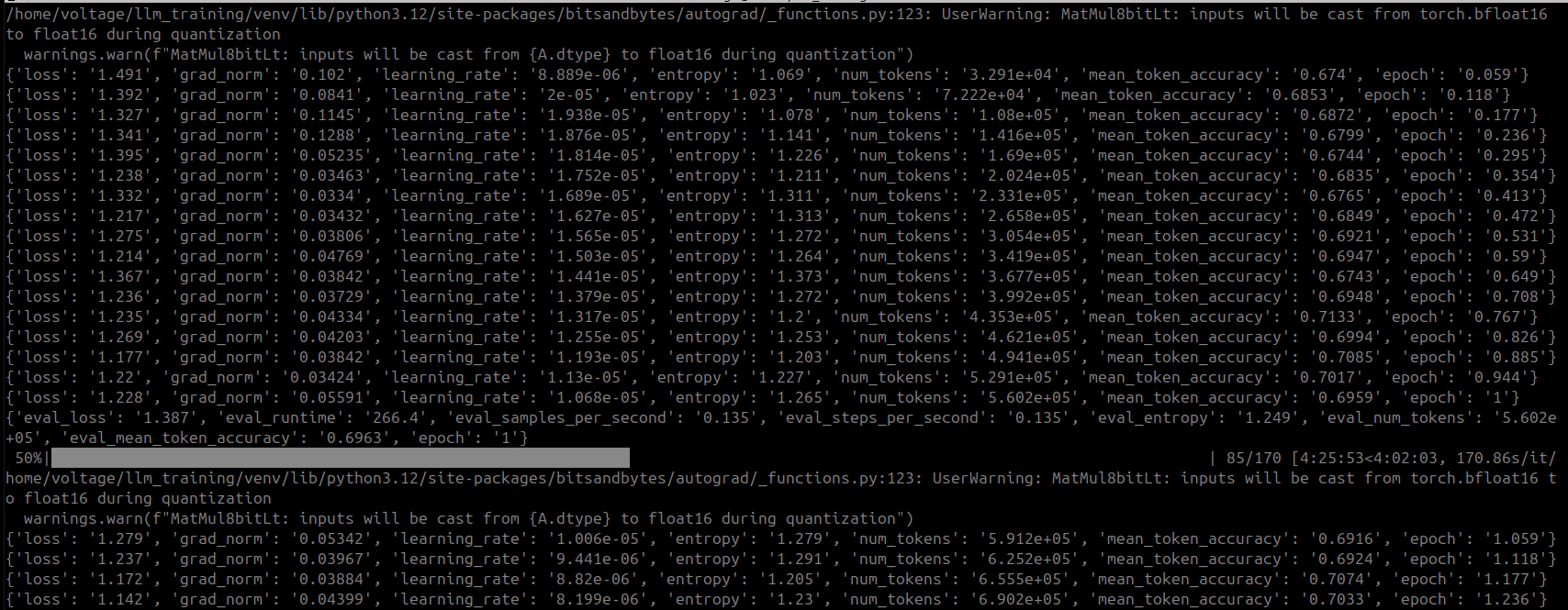
Learning rate decays from 1.068e-4 toward zero during epoch 2. Loss drops significantly:
| Step | Loss | Grad Norm | Token Accuracy | Epoch |
|---|---|---|---|---|
| 90 | 1.106 | 0.048 | 72.0% | 1.06 |
| 100 | 0.996 | 0.039 | 73.8% | 1.18 |
| 115 | 1.040 | 0.049 | 73.6% | 1.35 |
| 130 | 0.923 | 0.039 | 75.5% | 1.53 |
| 145 | 1.034 | 0.045 | 73.9% | 1.71 |
| 160 | 1.056 | 0.048 | 72.8% | 1.88 |
| 170 | 0.967 | 0.046 | 74.4% | 2.00 |
Epoch 2 Evaluation: eval_loss=1.142, eval_token_accuracy=72.4%
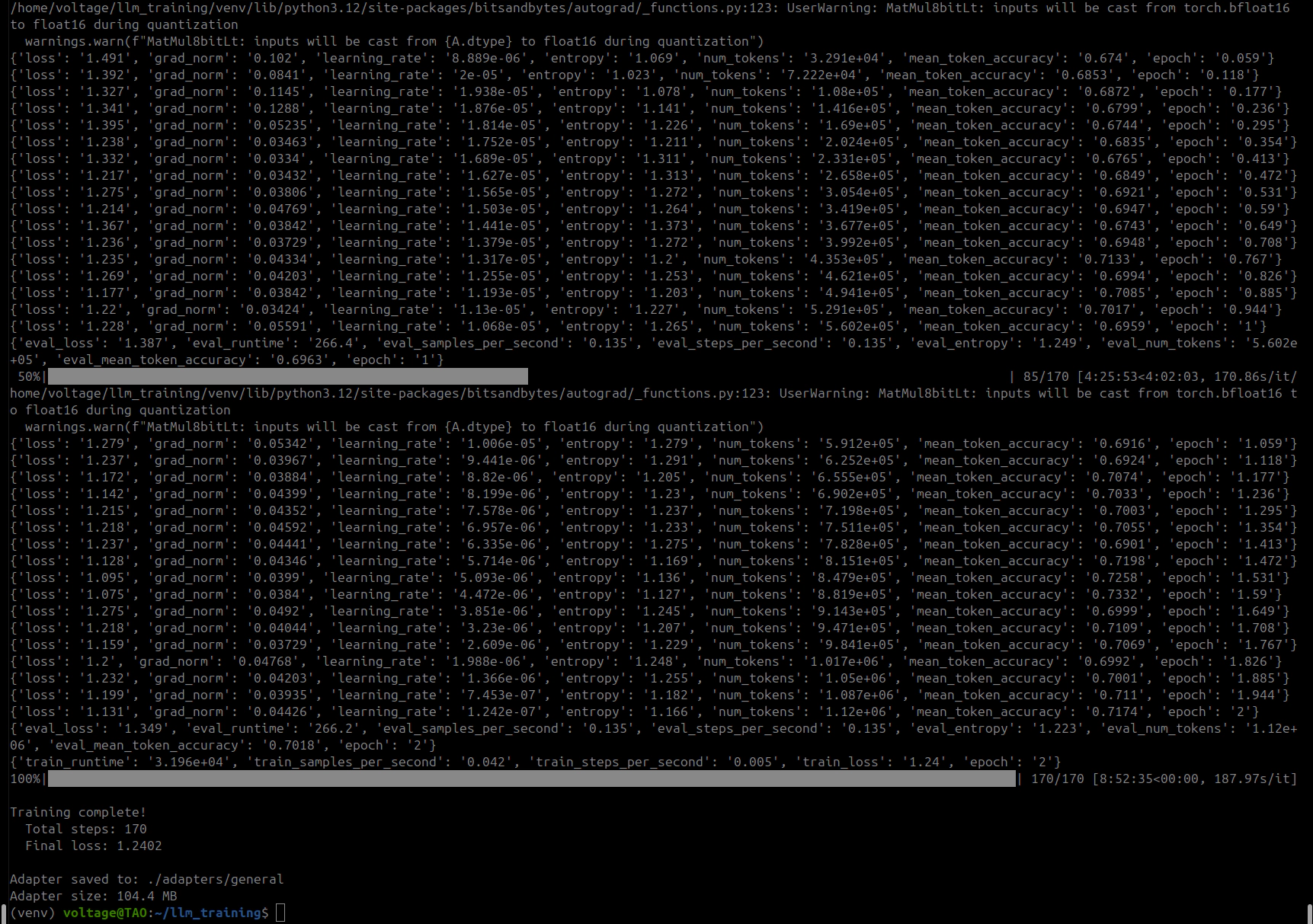
| Metric | Epoch 1 | Epoch 2 |
|---|---|---|
| Final training loss | 1.116 | 0.967 |
| Token accuracy | 71.7% | 74.4% |
| Eval loss | 1.209 | 1.142 |
| Eval token accuracy | 71.6% | 72.4% |
Training loss dropped 13% between epochs and eval loss improved alongside it, so the model appeared to be generalizing rather than memorizing. The gap between training loss (0.967) and eval loss (1.142) looked healthy. ~9 hours for 170 steps across 2 epochs. At this point I thought I was done. I was not.
The 8-bit quantization gets the GPU-resident portion from ~37GB down to ~30GB. CPU offloading parks 20 layers in system RAM so the GPU stays at 30GB. Patch 4 keeps real tensor data on CPU-offloaded layers instead of replacing them with empty meta placeholders, which is what lets backward actually compute gradients through those layers. And saved_tensors_hooks stops autograd from holding GPU references to every layer’s weights simultaneously, which is where the mystery 15GB was coming from.
All four are load-bearing. Pull any one and you get a crash or an OOM.
It is slow. ~170-190 seconds per step, roughly 10x what you’d get if the whole model fit in VRAM. Fine for datasets under 1,000 pairs. For anything much larger you’d be waiting days.
Only attention layers get LoRA adapters because the expert weights are fused 3D nn.Parameter tensors, not nn.Linear. The experts stay frozen. PEFT v0.17+ has experimental target_parameters support that might open this up eventually.
The patches target specific library versions. When transformers or accelerate ship a new release, expect internal APIs to shift and some of these to break.
RAM usage is significant. The CPU-offloaded weights (~28GB) plus autograd saved tensors (~40-60GB) plus OS overhead put you at ~114GB. 128GB is the realistic minimum; I had 192GB and it used about 60% of it.
This should work on other MoE models with fused expert tensors: Qwen3-MoE variants, DeepSeek-V2/V3 MoE. Mixtral uses nn.Linear experts so standard QLoRA already works there. The key check is whether your model’s expert weights are nn.Parameter (needs this approach) or nn.Linear (you don’t need any of this).
python3 -m venv venv
source venv/bin/activate
pip install torch --index-url https://download.pytorch.org/whl/cu128
pip install transformers accelerate bitsandbytes peft trl datasets
export PYTORCH_CUDA_ALLOC_CONF=expandable_segments:True
This tells PyTorch’s CUDA allocator to use expandable segments, which reduces fragmentation when tensors are constantly being allocated and freed (which is exactly what happens during CPU/GPU transfers).
PYTORCH_CUDA_ALLOC_CONF=expandable_segments:True python train_adapter.py --type general
Make sure nothing else is using the GPU. Ollama, inference servers, anything GPU-accelerated. Stop them before you start. I lost a 9-hour training run at 98% completion (step 167 of 170) because I asked Ollama a question and it loaded the model mid-training. 15GB of VRAM gone. The training process needed 384MB more and there was nowhere to get it. Three steps from the finish line. Don’t be me.
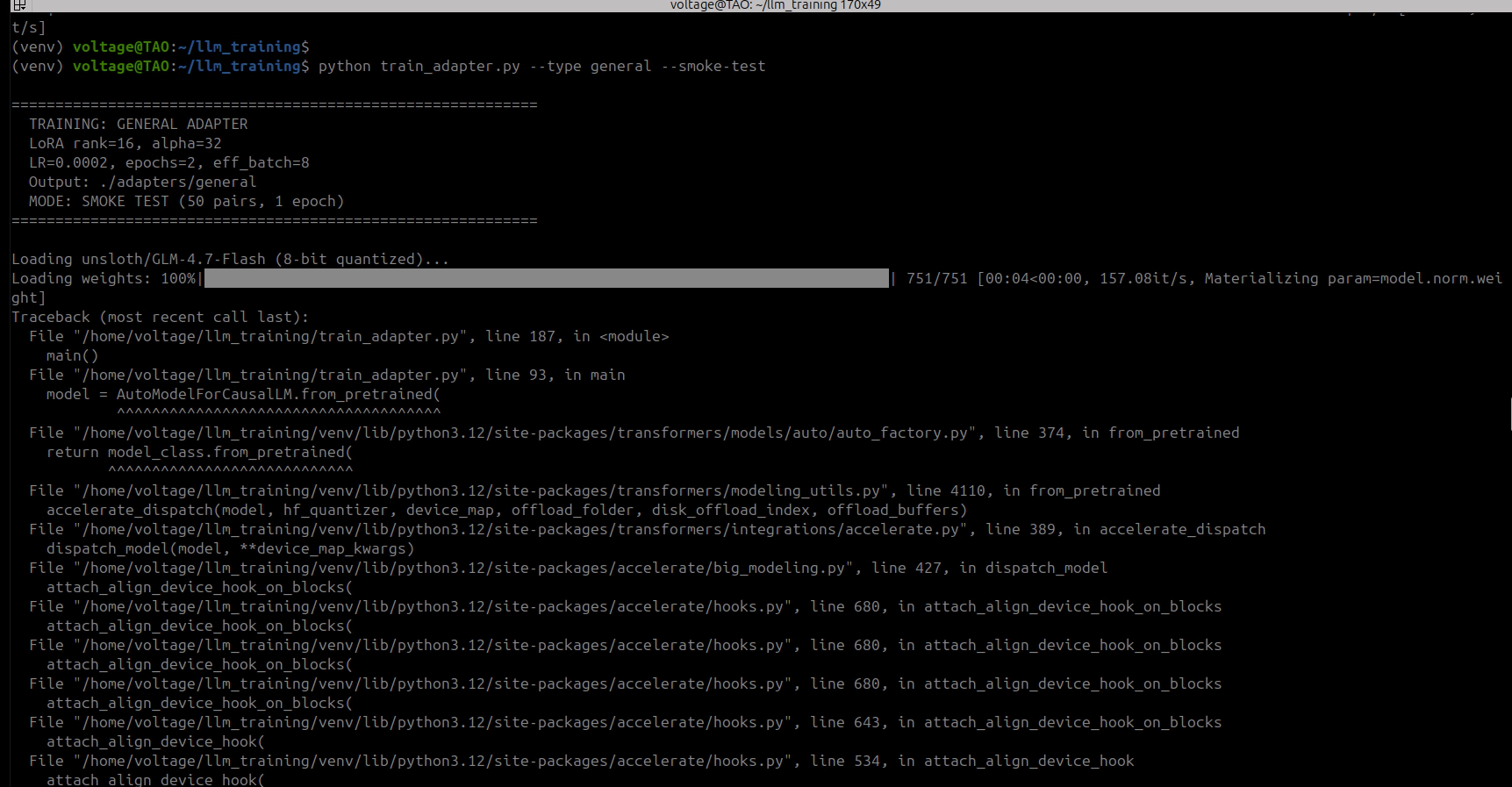
PYTORCH_CUDA_ALLOC_CONF=expandable_segments:True python train_adapter.py --type general --smoke-test
50 training pairs, 1 epoch. Done in about 20 minutes. Validates the full pipeline: model loading, patching, LoRA, training, eval, adapter save. Run this first.
This was my first time training a model. I went in knowing Python and cybersecurity, not PyTorch internals. Every OOM crash was a learning opportunity I didn’t ask for. I really didn’t!
The real blocker is not model size. It’s the fact that current quantization libraries cannot handle fused 3D expert tensors. That’s it. Fix that one thing and GLM-4.7-Flash trains on 48GB without any of this. Until quantization libraries catch up, CPU offloading with autograd memory management is the way. Slow, but it works.
If you’re sitting on a single GPU thinking you can’t fine-tune a 30B model, you can. It took me four monkey-patches, one custom trainer, a few crashed training runs, a lot of reading PyTorch source code and lots of screaming at Claude. But the adapter is 81MB and it works.
Training produces an 81MB PEFT adapter (safetensors). To actually use it in Ollama, you need a single merged GGUF file: base model weights + LoRA deltas baked in, quantized, and packaged. This should be the easy part. It was not.
The obvious first try. Load the model in 8-bit (same as training), merge the LoRA, export:
model = AutoModelForCausalLM.from_pretrained(base_model, load_in_8bit=True, device_map="auto")
model = PeftModel.from_pretrained(model, adapter_path)
model = model.merge_and_unload()
Result: ValueError: Some modules are dispatched on the CPU or the disk. Make sure you have enough GPU RAM to fit the model.
BitsAndBytes refuses to work when any modules are CPU-offloaded. The merge operation needs the full model on GPU, but 8-bit GLM-4.7-Flash is still ~46GB because of the unquantized expert tensors. Does not fit in 48GB.
Drop to 4-bit. Maybe the smaller attention layers free enough room:
model = AutoModelForCausalLM.from_pretrained(base_model, load_in_4bit=True, device_map="auto")
Result: Same error. The 3D fused expert tensors still cannot be quantized by BitsAndBytes, still get dispatched to CPU, still trigger the same rejection. 4-bit saves ~1GB total on the attention layers. The experts are the problem and they do not shrink.
Skip quantization entirely. Load in fp16, let device_map="auto" figure it out:
model = AutoModelForCausalLM.from_pretrained(base_model, torch_dtype=torch.float16, device_map="auto")
Result: torch.OutOfMemoryError: CUDA out of memory. Tried to allocate 768.00 MiB at layer 36 during expert tensor concatenation. The model in fp16 is ~60GB. GPU has 48GB. Even with CPU offloading, the merge operation tries to materialize large intermediate tensors on GPU.
Skip the merge entirely. Convert just the LoRA adapter to a GGUF file and let Ollama apply it at inference time via ADAPTER in the Modelfile:
python llama.cpp/convert_lora_to_gguf.py ./adapters/general/ --outfile adapter.gguf
Result: Two problems.
First, installing llama.cpp’s Python requirements nuked the training venv. It pulled in torch==2.6.0+cpu (replacing 2.10.0+cu128), transformers==4.57.6 (replacing 5.3.0.dev0), and numpy==1.26.4 (replacing 2.4.2). The older transformers version does not recognize GLM-4.7-Flash’s architecture (KeyError: 'glm4_moe_lite'). Had to manually reinstall every package to restore the training environment.
Second, after fixing the venv, the converter hit NotImplementedError when trying to split the kv_b_proj LoRA tensor. GLM-4.7-Flash uses a decomposed KV projection (kv_a_proj_with_mqa → kv_b_proj) that requires tensor splitting during GGUF conversion. The llama.cpp LoRA converter does not implement this for the GLM architecture.
The realization: you have 192GB of RAM. The model is 60GB in bf16. Just load the whole thing on CPU.
model = AutoModelForCausalLM.from_pretrained(
    base_model,
    torch_dtype=torch.bfloat16,
    device_map={"": "cpu"},     # everything on CPU, no GPU needed
    low_cpu_mem_usage=True,
)
model = PeftModel.from_pretrained(model, adapter_path, device_map={"": "cpu"})
model = model.merge_and_unload()
model.save_pretrained(merged_path, safe_serialization=True)
No GPU. No quantization during merge. No BitsAndBytes. No accelerate hooks. Load on CPU, merge on CPU, save as HF safetensors. Then use llama.cpp’s convert_hf_to_gguf.py (not the LoRA converter) to quantize the merged model to Q8_0:
python ~/llama.cpp/convert_hf_to_gguf.py ./merged_hf/ --outtype q8_0 --outfile dracula-general-q8_0.gguf
Result: Success. 844 tensors, 31.8GB Q8_0 GGUF. Completed in about 5 minutes: 2 minutes for the CPU merge, 2.5 minutes for the GGUF write. Peak RAM usage: ~120GB.
The intermediate merged HF model is ~56GB on disk. Delete it after GGUF conversion.
One more obstacle. ollama create dracula-general -f modelfiles/Modelfile.general returns 400 Bad Request: invalid model name. Tried every naming variation: underscores, colons, namespaces, direct API calls. All failed.
Ollama 0.16.1 has a bug (or undocumented behavior change) where the -f flag for specifying a Modelfile path does not work with ollama create. The workaround: copy the Modelfile to the current directory as Modelfile (the default filename), then run ollama create dracula-general with no -f flag.
cp modelfiles/Modelfile.general Modelfile
ollama create dracula-general
Model loaded. Both glm-4.7-flash:q8_0 (base) and dracula-general:latest (fine-tuned) show in ollama list at 31GB each.
First test via Ollama CLI (ollama run dracula-general "What is AMSI bypass?") looked promising. The model produced security-specific content about AmsiScanBuffer patching. Good enough to pass a quick glance.
Then I tested it through the web UI. Asked it to build a Windows 11 keylogger. The response started reasonable, then devolved into a loop, repeating the same block about Windows Defender’s Credential Guard, KPP/HVCI, and WDAC driver enforcement over and over. Hundreds of lines of the same paragraphs, cycling endlessly.
Other prompts produced different kinds of garbage:
"What is nmap?" → "how toSudo: command not found on windows 11 : r/sysadmin
NMAP for beginners — part one NMap vs. Nessus (port scanning and
vulnerability assessment)Why you should use the -sU flag..."
Incoherent fragments. Web page titles mixed with commands. Hallucinated tool names (namp, npmp, ncnapenr). Random policy numbers (E1672/S0068/E0470E0559-E06XX from Palo Alto PAN-SA rule sets).
Compared the fine-tuned model’s output against the base model with identical prompts. The base model was coherent, structured, and accurate. The fine-tuned model was not. The LoRA training had damaged the model.
The learning rate was the main problem. 2e-4 is fine for 7B models but way too aggressive for 30B. The weight updates were large enough to overwrite base knowledge without learning enough to replace it. On top of that, lora_alpha=32 with lora_rank=16 gives a 2x scaling factor, so every update was doubled before being applied. And with only 527 training pairs at that learning rate, the model memorized fragments of the training data while losing the ability to produce anything coherent on its own.
The frustrating part: the training metrics looked fine the whole time. Loss dropped from 1.48 to 0.97, eval loss improved from 1.21 to 1.14. Nothing in the numbers said “this model is broken.” The damage was subtler than that. The model could still produce security-related tokens. It just could not organize them into sentences that made sense.
Investigating the garbage output revealed a second problem. The Ollama model was missing the GLM-4.7 chat template.
Base model in Ollama:
RENDERER glm-4.7
PARSER glm-4.7
Custom GGUF model in Ollama:
TEMPLATE {{ .Prompt }} # bare passthrough, no chat formatting
When you build from a raw GGUF file, Ollama does not inherit the RENDERER/PARSER directives. It falls back to {{ .Prompt }}, which passes raw text without the [gMASK]<sop><|user|>...<|assistant|></think> framing the model expects. GLM’s chat template embeds a </think> tag before every assistant response (even with thinking disabled), and without proper framing the model does not know when to start or stop generating.
Fixed by adding RENDERER glm-4.7 and PARSER glm-4.7 to the Modelfile. This resolved the template issue but did not fix the underlying weight damage.
Before diagnosing the root cause, I tried fixing the looping behavior with inference parameters:
PARAMETER repeat_penalty 1.3
PARAMETER repeat_last_n 256
PARAMETER top_k 40
PARAMETER num_predict 2048
The repeat_penalty=1.3 stopped the exact-copy loops (the model no longer repeated identical paragraphs). But the outputs remained incoherent. The model just found new ways to produce garbage instead of repeating the same garbage. Repeat penalty treats the symptom, not the disease.
| Parameter | First Run (broken) | Second Run |
|---|---|---|
learning_rate |
2e-4 | 2e-5 |
lora_alpha |
32 | 16 |
warmup_ratio |
0.05 | 0.10 |
weight_decay |
0.01 | 0.05 |
num_epochs |
2 | 3 |
The thinking was: learning rate 10x lower (2e-5) so the weight updates don’t steamroll base knowledge. Alpha equals rank (16/16 = 1x scaling) instead of the 2x multiplier that amplified Run 1’s damage. Longer warmup (10% vs 5%) to ease into training. Stronger regularization (weight_decay=0.05) to punish the adapter for straying too far from base weights. And one extra epoch because the lower learning rate means the model needs more passes over the data to learn the same amount.
For large models (>13B), start with lr=2e-5 not 2e-4, set lora_alpha = lora_rank (1x scaling), use warmup_ratio >= 0.1, weight_decay >= 0.03, and prefer more epochs at low LR over fewer epochs at high LR.
The lr=2e-4, alpha=2*rank defaults you see in every tutorial were designed for 7B dense models fully quantized to 4-bit. They do not transfer to 30B MoE models with partial quantization and CPU offloading. The gradient dynamics are completely different when 80% of the weights cannot be quantized and 40% of layers are being shuttled between devices.
Training the model was the easy part. The four patches and autograd management, that was hard, but it was a clean engineering problem. Fix the crash, move on.
The export pipeline and the broken model were a different kind of hard. Five failed export approaches, a nuked Python environment, an Ollama CLI bug, a missing chat template, and a model that looked fine in training metrics but produced garbage at inference. None of these were obvious from the error messages. The OOM during export didn’t say “your model can’t be quantized because the experts are 3D tensors.” The broken model didn’t say “your learning rate was 10x too high.” Each one required reading source code and testing hypotheses against what the tools actually do versus what the docs claim.
Some things I wish I’d known going in: export via CPU merge if your model has non-standard tensor shapes, don’t waste time trying to make GPU-based paths work. Add RENDERER/PARSER to your Ollama Modelfile or it falls back to a bare passthrough template. Start with conservative hyperparameters (lr=2e-5, alpha=rank, warmup=10%, weight_decay=0.05) because you can always push harder later but you can’t undo damage from a learning rate that was too aggressive. And test inference with real prompts, not just training metrics. A model can show improving loss numbers while producing worse actual output. The metrics don’t measure coherence.
I wrote section 15 with confidence. Lower the learning rate, reduce alpha, increase regularization. The obvious correction for a model that had been trained too aggressively. I started training with those settings and went to research hyperparameters while it ran. That research taught me I had overcorrected just as badly in the other direction.
Most community configs and blog posts citing “use lr=2e-4 for GLM” are copying Unsloth’s demo setting, a 60-step quick test meant to show the pipeline works. The actual Unsloth GLM-4.7-Flash notebook (GLM_Flash_A100(80GB).ipynb) distinguishes two modes:
Demo:  lr=2e-4, max_steps=60        (fast proof-of-concept)
Full:  lr=2e-5, num_epochs=1         (actual production training)
My broken Run 1 used the demo LR for a full 2-epoch run. That was the core mistake.
But the notebook also consistently uses lora_alpha = 2 * lora_rank. Every community config does too. Every piece of research on LoRA scaling confirms it. The “rule of thumb” I wrote in section 15.2, set alpha = rank (1x), was wrong.
The real metric is effective learning rate: learning_rate * (alpha / rank). This is the actual step size applied to the base model weights on every update.
| Run | LR | Alpha/Rank | Effective LR | vs Unsloth |
|---|---|---|---|---|
| Run 1 (broken) | 2e-4 | 32/16 = 2x | 4e-4 | 10x too high |
| Run 2 (section 15) | 2e-5 | 16/16 = 1x | 2e-5 | 0.5x (too low) |
| Unsloth official | 2e-5 | 16/8 = 2x | 4e-5 | baseline |
Run 1 had 10x the recommended effective LR. Run 2 had half. The Unsloth config sits right in the middle.
Other community configs for MoE models of this size:
| Model | LR | Alpha/Rank | Effective LR |
|---|---|---|---|
| Qwen3-30B-A3B (swift docs) | 1e-4 | 32/8 = 4x | 4e-4 |
| Qwen3-VL-30B-A3B (Medium) | 2e-4 | 128/64 = 2x | 4e-4 |
| Mixtral 8x7B (vessl.ai) | 5e-5 | 16/8 = 2x | 1e-4 |
| DeepSeek-MoE (official) | — | 32/8 = 4x | — |
The universal consensus: alpha = 2 * rank minimum. Some go to 4x. Nobody uses 1x.
| Factor | Value | Problem |
|---|---|---|
| Effective LR | 2e-5 | Half the Unsloth baseline, updates too small |
| weight_decay | 0.05 | 50x Unsloth’s 0.001, actively penalizing learning |
| warmup_ratio | 0.10 | 2x standard, wasting more steps at near-zero LR |
| Combined | Model barely moves from base after 9+ hours |
I killed it before it finished. 15 hours of compute to produce something nearly identical to the base model. The overcorrection was just as bad as the original mistake, just in the opposite direction.
Section 15.2 was wrong. Here’s what actually works for 30B MoE models:
learning_rate = 2e-5 for full training (not demos), lora_alpha = 2 * lora_rank (universal, 2x minimum), weight_decay = 0.001, warmup_ratio = 0.05, lora_dropout = 0. Keep it to 1-2 epochs; Sebastian Raschka and Lightning AI both found performance declines with more.
The effective LR should land at 4e-5 for this model size. That’s 10x the full fine-tuning LR of 4e-6, which matches the research finding that LoRA optimal LR is consistently ~10x the FFT rate (arxiv 2602.04998, “LoRA Without Regret”).
| Parameter | Run 1 (broken) | Run 2 (killed) | Run 3 (this) | Unsloth Official |
|---|---|---|---|---|
learning_rate |
2e-4 | 2e-5 | 2e-5 | 2e-5 |
lora_alpha |
32 | 16 | 32 | 16 |
lora_rank |
16 | 16 | 16 | 8 |
| Effective LR | 4e-4 | 2e-5 | 4e-5 | 4e-5 |
weight_decay |
0.01 | 0.05 | 0.001 | 0.001 |
warmup_ratio |
0.05 | 0.10 | 0.05 | ~0.05 |
lora_dropout |
0.05 | 0.05 | 0 | 0 |
num_epochs |
2 | 3 | 2 | 1 |
| Target modules | attn only | attn only | attn only | all-linear |
The effective LR now matches Unsloth’s official recommendation exactly: 2e-5 * (32/16) = 4e-5. We use rank 16 instead of Unsloth’s 8, more capacity per adapter to compensate for targeting fewer modules. Higher rank at the same effective LR does not change the step size; it gives each module more dimensions to learn in.
Training completed in approximately 9 hours. 170 steps across 2 epochs, 678 training samples, 36 validation.
Epoch 1:
| Step | Loss | Grad Norm | Token Accuracy | LR |
|---|---|---|---|---|
| 5 | 1.491 | 0.085 | 67.4% | 1.88e-5 |
| 10 | 1.412 | 0.069 | 67.0% | 3.53e-5 |
| 15 | 1.424 | 0.079 | 67.0% | 3.98e-5 |
| 25 | 1.330 | 0.056 | 68.2% | 3.96e-5 |
| 45 | 1.200 | 0.052 | 70.5% | 3.64e-5 |
| 65 | 1.168 | 0.051 | 71.3% | 2.93e-5 |
| 85 | 1.131 | 0.063 | 71.7% | 2.04e-5 |
Epoch 1 eval: loss=1.349, token accuracy=70.3%
Epoch 2:
| Step | Loss | Grad Norm | Token Accuracy | LR |
|---|---|---|---|---|
| 90 | 1.115 | 0.046 | 71.4% | 1.90e-5 |
| 105 | 1.074 | 0.053 | 72.1% | 1.30e-5 |
| 125 | 1.060 | 0.052 | 72.5% | 5.84e-6 |
| 145 | 1.040 | 0.048 | 72.7% | 1.47e-6 |
| 170 | 0.992 | 0.048 | 73.1% | 0 |
Epoch 2 eval: loss=1.349, token accuracy=70.3%
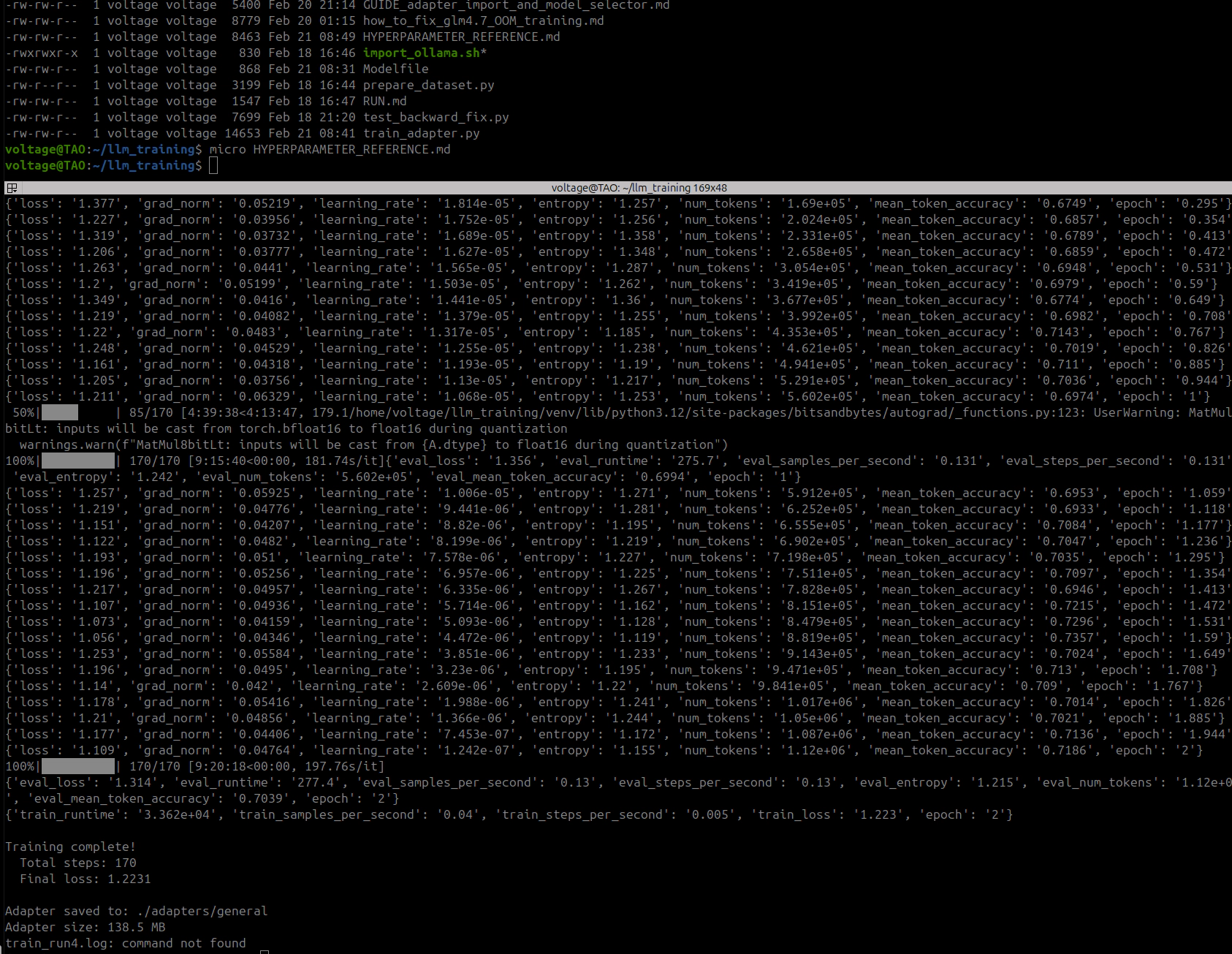
Summary:
| Metric | Epoch 1 | Epoch 2 |
|---|---|---|
| Final training loss | 1.131 | 0.992 |
| Token accuracy | 71.7% | 73.1% |
| Eval loss | 1.349 | 1.349 |
| Eval token accuracy | 70.3% | 70.3% |
Metrics looked healthy. Gradient norms stayed in the 0.04-0.08 range, no explosions. Loss decreasing smoothly. Eval loss flat between epochs, which suggested the model had extracted about as much as it could from the data in terms of token prediction.
Interesting comparison to Run 1: training loss ended slightly higher (0.992 vs 0.967) but eval loss was significantly worse (1.349 vs 1.142). That wider gap actually makes sense in hindsight. Run 1’s better eval loss was probably just the model memorizing specific token sequences from training, the kind of overfitting that looks good in metrics but produces garbage at inference.
Adapter saved at 81MB. Exported to GGUF via the same CPU merge pipeline from section 13.5.
Imported the Run 3 GGUF into Ollama with the correct RENDERER/PARSER directives (lesson learned from section 14.3). Ran the first test:
Prompt: "What is nmap? Answer in 2 sentences."

Base model (glm-4.7-flash:q8_0):
  "Nmap (Network Mapper) is a free and open-source utility used for network
   discovery and security auditing. It allows administrators and security
   professionals to scan networks, identify live hosts, open ports, and detect
   service versions."

Fine-tuned (dracula-general, Run 3):
  "NMAP (Network Mapper) identifies open ports on hosts by scanning them
   without sending data that generates logs or alerts—making it ideal for
   discovery before actual attacks.

   It also probes host OS types via TCP fingerprint differences since the
   initial handshake varies between operating systems; this helps choose attack
   payloads tailored specifically toward your target's stack rather than
   guessing blindly at a custom shellcode header based solely off IP addresses
   found through shodan searches like 'site:shoda.n c ip=10.x.xx .x' which
   might trigger IDS/IPS sensors if you hit too many random IPs quickly anyway
   because NSE scripts run against each port independently so they don't require
   re-scanning everything just one-by-one checks instead of bulk scans over all
   known CVEs first then narrow down specific vulnerabilities per service later
   after confirming versions using mismatched banner strings from telnet outputs
   etc... wait getting sidetracked again!"
The base model: clean, factually correct, followed the “2 sentences” instruction.
The fine-tuned model: starts with a plausible-sounding sentence, then immediately derails into an unstructured stream of consciousness. Hallucinated Shodan syntax (site:shoda.n c), factual errors (nmap absolutely does send data that generates logs), self-aware confusion (“wait getting sidetracked again!”), and complete inability to follow the “2 sentences” constraint.
The simplest possible test:
Prompt: "Give me a one-liner to find SUID binaries on Linux."

Base model:
  find / -perm -4000 -type f 2>/dev/null

Fine-tuned (temperature 0.3, repeat_penalty 1.5):
  find / -perm 4000 !-name '.*' \( \! '(' '-user root ')' && \
      '\( '\''/usr/local/bin'\'' || '\' '/bin/su*' OR ''\!/sbin/\*'

  Wait that's wrong syntax.

  Correct version:
  sudo grep '^rws---x--$:' $(grep ^S:$(cut-df:/etc/passwd) $PATH)/suid-bins
  No still not right

  Final correct answer:
  (for f; do [ "$(stat-c %a "$1")" = "4755"]&&echo"$2";done)<<(ls-FdR
The base model produced a perfect, standard one-liner. The fine-tuned model produced three different wrong commands, each more broken than the last, with self-correction attempts that made things worse. None of the three commands would execute. Even at temperature 0.3 with aggressive repeat penalty, the model could not produce a simple find command.
This was not the same failure mode as Run 1. Run 1’s model looped endlessly on the same paragraphs. Run 3’s model could at least generate unique content and did not get stuck in repetition loops. But the content was still incoherent. The quality sat somewhere between “complete garbage” and “drunk person explaining hacking”, an improvement over Run 1, but not remotely usable.
Run 3’s training metrics were fine by every standard measure. Loss decreased smoothly (1.49 → 0.99), gradient norms were stable, eval loss was flat, token accuracy went from 67% to 73%. None of it predicted what the model would actually produce at inference.
Training metrics measure a very specific thing: cross-entropy loss on held-out examples from the same distribution. They do not measure whether the model can follow instructions, hold a thought across multiple sentences, or write a syntactically valid shell command. The model got better at predicting the next token in training sequences and worse at everything else.
I had diagnosed Run 1’s failure as hyperparameter damage in section 14.2. That was partly right: the high learning rate caused the loops and memorized fragments. But Run 3 used correct hyperparameters and still broke. Something more fundamental was wrong.
Here is the layer structure of GLM-4.7-Flash:
Layer 0 (dense):
  self_attn:  q_a_proj, q_b_proj, kv_a_proj_with_mqa, kv_b_proj, o_proj  (nn.Linear)
  mlp:        gate_proj, up_proj, down_proj                                (nn.Linear)

Layers 1-46 (MoE):
  self_attn:  q_a_proj, q_b_proj, kv_a_proj_with_mqa, kv_b_proj, o_proj  (nn.Linear)
  mlp:
    experts:         gate_up_proj [64, 3072, 2048]                         (nn.Parameter, 3D)
                     down_proj    [64, 2048, 1536]                         (nn.Parameter, 3D)
    gate:            weight       [64, 2048]                               (nn.Linear — DO NOT touch)
    shared_experts:  gate_proj, up_proj, down_proj                         (nn.Linear)
Our TARGET_MODULES for all three runs:
["q_a_proj", "q_b_proj", "kv_a_proj_with_mqa", "kv_b_proj", "o_proj"]
Five attention modules per layer. Zero MLP modules. Zero shared expert modules.
21 million trainable parameters. 0.07% of the model. All in attention.
In a transformer, the attention layers decide what information to attend to, which tokens in the context matter for predicting the next token. The MLP/expert layers decide what to do with that information. They transform the attended representation into the output.
When you fine-tune only the attention layers, you change what the model looks at without changing what it does with what it sees. The attention mechanism starts routing different information to the MLP layers, but those MLP layers were trained to handle the original attention distribution. They get inputs they were never designed for.
It’s not immediately obvious because the first few tokens look fine. The LoRA deltas are small relative to base weights, so early in a response the attention hasn’t diverged much and the MLP layers can handle it. But by the second or third sentence, the shifted attention patterns have cascaded through 47 layers of residual connections. Each layer feeds the next, the misalignment compounds, and by the time you reach the LM head the representation is far enough off-distribution that the model starts producing tokens that would never normally appear together. That’s where you get the hallucinated URLs, broken syntax, and run-on self-corrections.
Every published fine-tuning config for MoE models of this class targets both attention and MLP:
| Source | Target Modules |
|---|---|
| Unsloth GLM-4.7-Flash notebook | q_proj, k_proj, v_proj, o_proj, gate_proj, up_proj, down_proj |
| DeepSeek-MoE (official finetune.py) | q_proj, k_proj, v_proj, o_proj, gate_proj, up_proj, down_proj |
| Qwen3-30B community configs | all-linear |
| Mixtral 8x7B (Axolotl) | q_proj, k_proj, v_proj, o_proj, gate_proj, up_proj, down_proj |
None of them target attention only. None.
I did not realize this because I was focused on the wrong problem. The fused 3D expert tensors (nn.Parameter) cannot have LoRA applied to them. I knew that. I concluded that the only option was attention-only LoRA. I was wrong. There was a third component I had not examined.
Each MoE layer has three types of components. The routed experts (64 per layer, fused 3D nn.Parameter tensors) cannot be LoRA’d. Only 4 of 64 activate per token. The expert gate/router is nn.Linear but research consensus says do not touch it; fine-tuning the router destabilizes expert selection. And then there are the shared experts: one per layer, standard nn.Linear layers (gate_proj, up_proj, down_proj), process every token regardless of routing. They can be LoRA’d. PEFT handles them natively.
I had been staring at the fused 3D expert tensors and concluding “we can’t LoRA the MLP layers.” The shared experts were sitting right next to them in the architecture the whole time. I just didn’t look closely enough.
# Before (Runs 1-3): attention only
TARGET_MODULES = [
    "q_a_proj", "q_b_proj", "kv_a_proj_with_mqa", "kv_b_proj", "o_proj",
]
# 235 modules, 21M params (0.07%)

# After (Run 4): attention + shared expert FFN
TARGET_MODULES = [
    "q_a_proj", "q_b_proj", "kv_a_proj_with_mqa", "kv_b_proj", "o_proj",
    "gate_proj", "up_proj", "down_proj",
]
# ~376 modules, ~30-40M params (~0.1-0.13%)
Adding three module names. That is the entire change. Same hyperparameters, same dataset, same training pipeline, same export process.
The gate_proj, up_proj, down_proj names match:
model.layers.0.mlp.gate_proj (Linear)model.layers.N.mlp.shared_experts.gate_proj (Linear)PEFT resolves module names by substring matching. The fused 3D expert tensors (model.layers.N.mlp.experts.gate_up_proj and model.layers.N.mlp.experts.down_proj) are nn.Parameter on a Glm4MoeLiteNaiveMoe module. They are not child modules, so PEFT does not see them. Only the nn.Linear instances match.
Three training runs. Two broken models. One killed mid-training.
| Run | Time | Result | What Was Wrong |
|---|---|---|---|
| 1 | ~9h | Infinite loops, hallucinated garbage | LR 10x too high (effective 4e-4) |
| 2 | ~2h (killed) | Never finished | LR 2x too low (effective 2e-5) |
| 3 | ~9h | Coherent start → incoherent finish | Attention-only LoRA (no MLP modules) |
The hyperparameter corrections between Run 1 and Run 3 were real and necessary, but not sufficient. The fundamental issue was not how aggressively the model was being trained. It was what parts of the model were being trained. Attention and MLP work as a pair. Train one without the other and you get a model that looks at the right things but says the wrong things.
The shared expert FFN layers were standard nn.Linear modules the whole time. No special handling, no additional patches. PEFT supports them out of the box. Every guide I found targets attention + MLP together. I now understand why. It’s not optional.
Run 4 starts now. Same hyperparameters as Run 3. Three additional module names. Another 9 hours to find out if the model can produce a correct find command.